CALL US AT 1-833-4-KM4MPF / 1-833-456-4673 AND FIND OUT WHEN WE WILL BE AT A HAMFEST NEAR YOU.
4000 7th ave
Chattanooga, TN. 37407
BusinessHours
Monday-Friday
8:00 till 4:00
Saturday
9:00 till 1:00
Sunday
Closed

Your one-stop shop for all of your Radio needs
BIG JIM'S RUNNING SOME AWESOME SEPTEMBER DEALS! GET YOURS WHILE YOU CAN!
Free Shipping on all C.Crane Radios in the lower 48!
SPECIAL ITEMS SHIPPING FREE ARE LOWER 48 ONLY, OTHERS PLEASE PHONE IN YOUR ORDERS
FREE SHIPPING ON MOST ORDERS OVER $100.00 IN THE LOWER 48 STATES.
WE SHIP TO ALL 50 STATES AND US TERRITORIES.
HAVE QUESTIONS? CALL US 1-833-456-4673 TOLL FREE
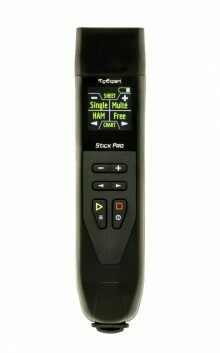
Frequency range: 0.1 ~ 600 MHz
Frequency input step: 1 kHz
Measurements for 25, 50, 75, 100, 150, 200, 300, 450 and 600Ω systems
SWR measurement range: from 1 to 100 in digital mode, from 1 to 10 in graph modes
Range R and X: 0… 2000, -2000… 2000
Operating modes: SWR, Return loss, R, X, Z, L, C, magnitude and phase angle at one frequency. SWR chart, 100 points. Multé mode – for quick testing of a multi-band antenna.
HF output: Connector type: N-type. Output signal shape: pies, from 0.1 to 600 MHz. Output power: -10 dBm (at a load of 50 Ohms).
Power: One lithium-ion battery 3.7 V type 18650. When the analyzer is connected to a PC or DC adapter with a USB connector, it receives power from these sources
Interface: 200 × 200 TFT display. 2 × 3 keys on the waterproof keyboard. English menu and help screens. USB connection to a personal computer
Bluetooth: v.4.2 BLE Single Mode, Class B
Dimensions: 185 mm x 40 mm x 33 mm (7.3 inches x 1.6 inches x 1.3 inches)
Operating temperature: 0 … 40 ° C (32 … 104 ° F)
Weight: 185 g (6.5 ounces) with battery
Warranty: 2 years
GTIN-13: 4820185420280
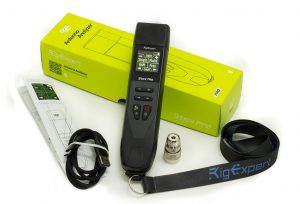
RigExpert Stick Pro is made in Ukraine.
* All specifications are subject to change without notice or obligation.
 key. – when connecting the analyzer to a PC via a USB cable (the analyzer will turn on automatically). – by long-pressing one of the keys :


 Important! At the same time, the analyzer will turn on and activate the measurement mode to which the pressed key corresponds.You can turn off the analyzer from any mode by long pressing the key.
key a screen with the main menu of the analyzer is available for the user.Important! Unlike the Stick 230 analyzer, the Stick Pro analyzer has three main screens with menus.
key.
Important! At the same time, the analyzer will turn on and activate the measurement mode to which the pressed key corresponds.You can turn off the analyzer from any mode by long pressing the key.
key a screen with the main menu of the analyzer is available for the user.Important! Unlike the Stick 230 analyzer, the Stick Pro analyzer has three main screens with menus.
key.
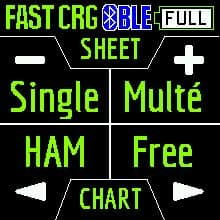
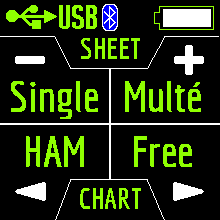 Singe Multé HAM Free The Singe and Multé modes display the measurement result as numbers, while the HAM and Free modes display the measurement results as numbers and charts.
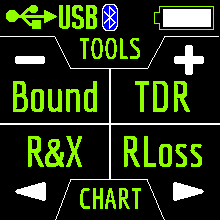 Bound TDR R&X RLoss The TDR, R&X and RLoss modes display the result in the form of charts and numbers, and the Bound mode in the form of numbers and color indication.
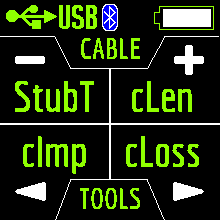 StubT cLen cImp cLoss The cImp and cLoss modes display the result in the form of charts and numbers, and StubT and cLen mode in the form of numbers and color indication.When you press
  in the Main Menu, 13 information screens will be available.
key, you can switch to the corresponding measurement mode.
key, you will enter the Settings menu.
in the Main Menu, 13 information screens will be available.
key, you can switch to the corresponding measurement mode.
key, you will enter the Settings menu.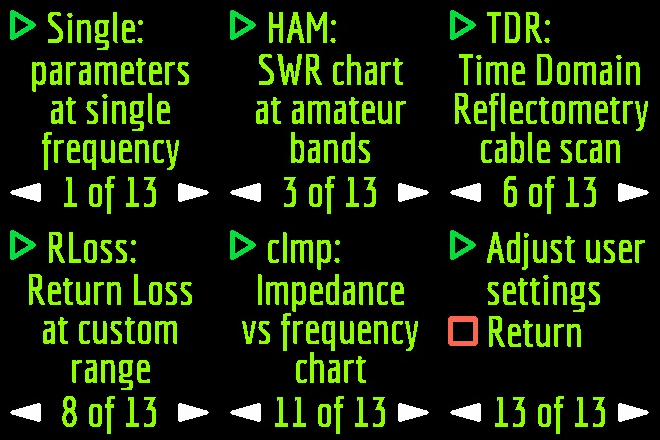 key.
once. You can resume the measurement by pressing once.In Single mode, the analyzer has 5 screens with information.
keys.
and A single press changes the frequency value minimally. If you press and hold the keys, the frequency will change continuously with an accelerated step. key for 2 seconds. After that, an information window will appear on the analyzer screen. Press key again. A window will appear on the analyzer screen with the setting of the operating frequency. The keys select the cursor position to change units, tens, hundreds, thousands of kHz, and the keys change the value. key saves the change and returns to Single mode. A single press of the key returns to Single mode without saving changes. The help menu is accessible by pressing and holding the key and then selecting the Help mode with the keys.
key.
once. You can resume the measurement by pressing once.In Single mode, the analyzer has 5 screens with information.
keys.
and A single press changes the frequency value minimally. If you press and hold the keys, the frequency will change continuously with an accelerated step. key for 2 seconds. After that, an information window will appear on the analyzer screen. Press key again. A window will appear on the analyzer screen with the setting of the operating frequency. The keys select the cursor position to change units, tens, hundreds, thousands of kHz, and the keys change the value. key saves the change and returns to Single mode. A single press of the key returns to Single mode without saving changes. The help menu is accessible by pressing and holding the key and then selecting the Help mode with the keys.
 – SWR from 1.0 to 1.14 – SWR from 1.1 to 1.153 – SWR from 1.15 to 1.32 – SWR from 1.3 to 1.71 – SWR from 1.7 to 3.0The SWR over 3 analyzer in Multé mode ignores.If, after scanning, the analyzer didn’t find a single resonance, then this means that either your antenna has a minimum SWR of more than 3, or the antenna or coaxial cable is damaged.
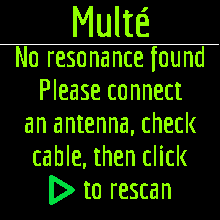 Restarting this mode is possible by pressing any key except key.
keys. When you press the keys on one of the results screens, the analyzer switches to HAM mode on the same band.
Restarting this mode is possible by pressing any key except key.
keys. When you press the keys on one of the results screens, the analyzer switches to HAM mode on the same band.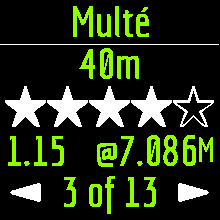

 A long press of the key will bring up the Help menu.
key or when the analyzer is off by a long press of the same key. The measurement will be performed automatically in the range that was used in the previous measurement.To repeat the measurement, press once. To measure in a cycle, press the key two times at short intervals. A long press of the key will bring up the Help window. You can change the measuring range using the keys.
A long press of the key will bring up the Help menu.
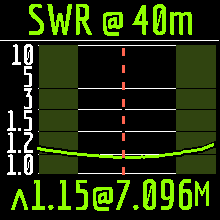
key or when the analyzer is off by a long press of the same key. The measurement will be performed automatically in the range that was used in the previous measurement.To repeat the measurement, press once. To measure in a cycle, press the key two times at short intervals. A long press of the key will bring up the Help window. You can change the measuring range using the keys.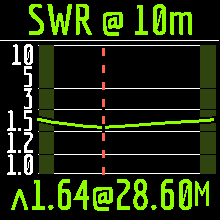 In HAM mode, the SWR icon and the range over which the measurement is carried out are displayed at the top of the screen.In the center of the screen, a chart of the SWR values for the range is displayed.The value of the minimum SWR found and the frequency at which this value was found are displayed at the bottom of the screen.Important! To the left and right of the graph are two vertical stripes. They indicate going out of range. Sometimes the resonance of the antenna may be out of range, but very close to the beginning or end. In such cases, the analyzer will determine the resonance beyond the limits of the ranges.When you press the or keys the analyzer switches to Free mode with the center frequency of measurement corresponding to the center frequency of the selected range:
 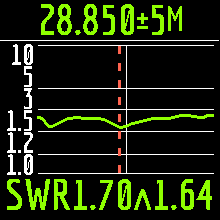 You can exit the mode in the main menu by briefly pressing the key.
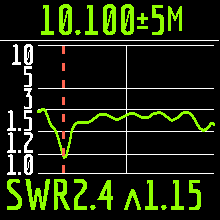 keys. Pressing the key once will change the frequency discretely to a certain value. Pressing and holding the key will cause an accelerated continuous change in frequency. After press, a window will be available with a choice of setting the center frequency, exit or calling Help. Press briefly and enter the frequency setting menu.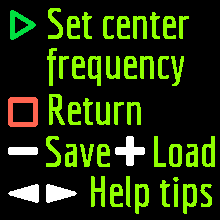
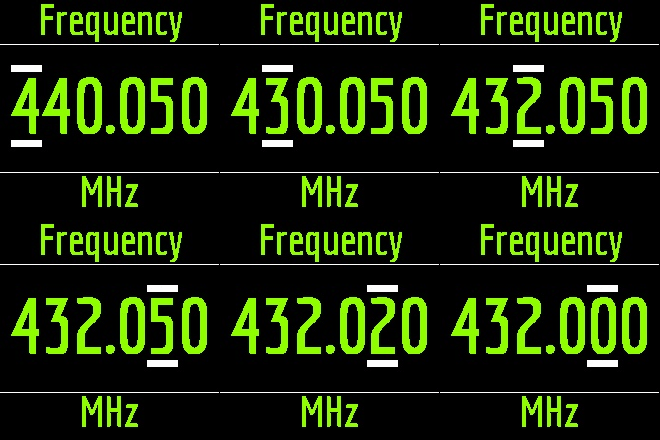 The keys select the cursor position to change units, tens, hundreds, thousands of kHz, and the keys change the value.
keys.
key will cause a measurement in a loop. To stop click key.
key.
key. Then press the key (Save).
keys to select an empty memory slot and press the key.
The keys select the cursor position to change units, tens, hundreds, thousands of kHz, and the keys change the value.
keys.
key will cause a measurement in a loop. To stop click key.
key.
key. Then press the key (Save).
keys to select an empty memory slot and press the key.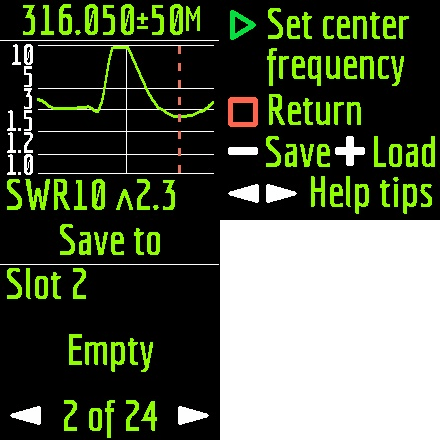 You can name the cell (maximum 13 characters). Use the keys to select a character, the key to adding a character, and the key to delete a character.
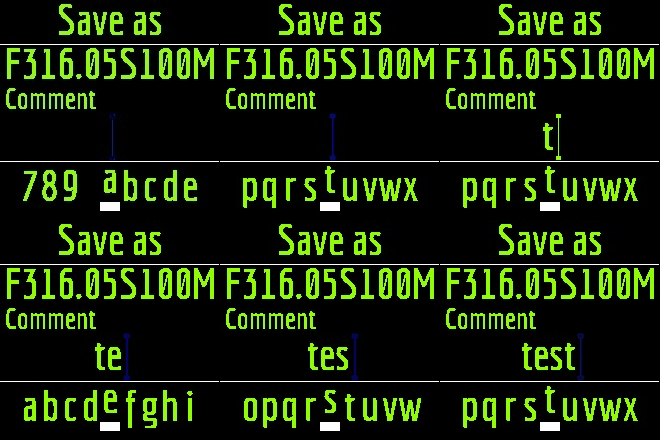 Loading results from memory is similar, instead of the key, use the key.
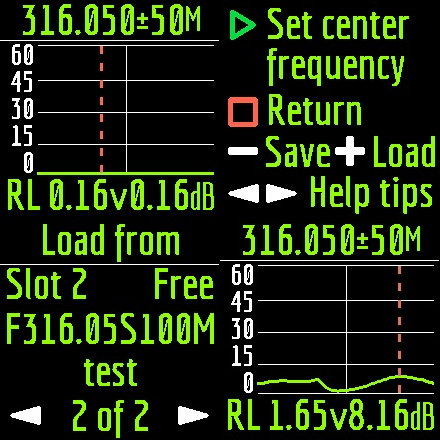 Important! In HAM mode, you can only load measurements that have been taken and saved in this mode.
key) the value of the operating frequency.
Important! In HAM mode, you can only load measurements that have been taken and saved in this mode.
key) the value of the operating frequency.
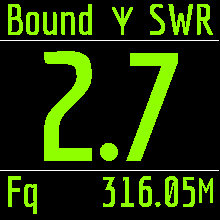
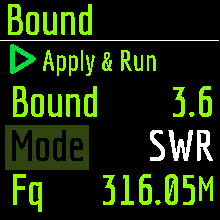 This mode is convenient when you tune the antenna and at the same time visually follow the readings on the analyzer screen. Large print and color alarms will not let you miss out on the best results.
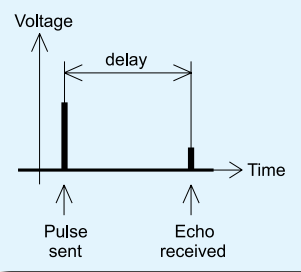
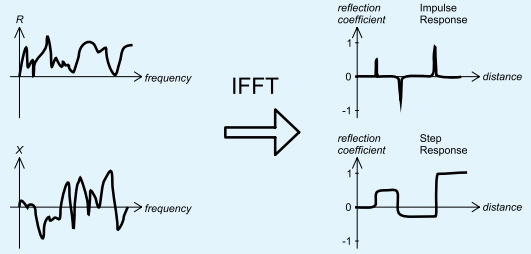
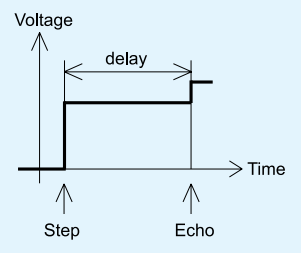 Unlike many other commercially-available reflectometers, Stick Pro does not send pulses into the cable. Instead, another technique is used. First, R and X (the real and the imaginary part of the impedance) are measured over the whole frequency range (up to 600 MHz). Then, the IFFT (Inverse Fast Fourier Transform) is applied to the data. As a result, impulse response and step response are calculated.
 Connect the cable to the analyzer and click the key. Do not forget to set the vel. factor of the cable used in the settings.
 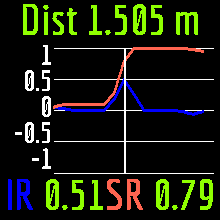 Use the keys to change the vertical scale.
keys to change the position of the cursor on the chart.
Use the keys to change the vertical scale.
keys to change the position of the cursor on the chart.

 In RL mode, the following is displayed on the analyzer screen:
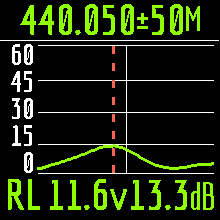 keys. Pressing the key once will change the frequency discretely to a certain value. Pressing and holding the key will cause an accelerated continuous change in frequency. After press, a window will be available with a choice of setting the center frequency, exit or calling Help. Press briefly and enter the frequency setting menu. The keys select the cursor position to change units, tens, hundreds, thousands of kHz, and the keys change the value.
keys.
key will cause a measurement in a loop. To stop click key.
key.
key.
keys. Pressing the key once will change the frequency discretely to a certain value. Pressing and holding the key will cause an accelerated continuous change in frequency. After press, a window will be available with a choice of setting the center frequency, exit or calling Help. Press briefly and enter the frequency setting menu. The keys select the cursor position to change units, tens, hundreds, thousands of kHz, and the keys change the value.
keys.
key will cause a measurement in a loop. To stop click key.
key.
key.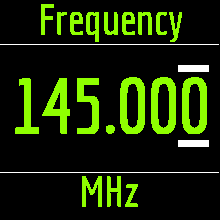 The frequency band is changed by pressing the keys.
and keys.The R&X mode works in two modes:Standard. In this mode, changing the shift of the cursor with the keys will cause repeated measurement and redrawing of the chart.
The frequency band is changed by pressing the keys.
and keys.The R&X mode works in two modes:Standard. In this mode, changing the shift of the cursor with the keys will cause repeated measurement and redrawing of the chart.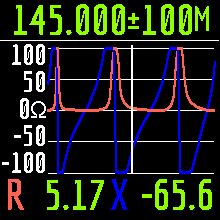 In pan mode, you can move the cursor left and right without redrawing the chart. This is convenient when you need to quickly view the R X values in a certain frequency range.
and keys.
In pan mode, you can move the cursor left and right without redrawing the chart. This is convenient when you need to quickly view the R X values in a certain frequency range.
and keys.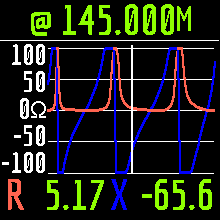 Exit the mode – quickly press the key.
key to start.
Exit the mode – quickly press the key.
key to start.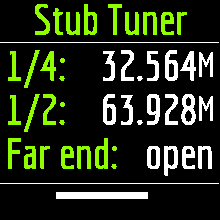 The analyzer will immediately show resonant frequencies for both quarterwave and halfwave stubs.
key.After that, the information window will be available:
The analyzer will immediately show resonant frequencies for both quarterwave and halfwave stubs.
key.After that, the information window will be available: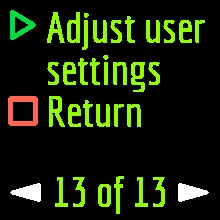 Pressing the key will take the analyzer to the Settings menu. Pressing the key will return the analyzer to the Main menu.Change of settings screens is carried out with keys and change of parameters with keys.There are currently 11 basic settings available in the Stick Pro analyzer:
key. key.
Pressing the key will take the analyzer to the Settings menu. Pressing the key will return the analyzer to the Main menu.Change of settings screens is carried out with keys and change of parameters with keys.There are currently 11 basic settings available in the Stick Pro analyzer:
key. key. If the analyzer model does not appear, then this means that the program could not recognize the analyzer. Try reconnecting the analyzer, closing and reopening the program, used a different USB cable.Important! Using a Bluetooth connection, Stick Pro analyzer operation with AntScope2 is currently not possible. This is due to limited support for the Bluetooth Low Energy protocol used in the Windows operating systems analyzer.The Stick Pro analyzer, together with AntScope for Android, works with smartphones and tablets running Android version 6 and higher.
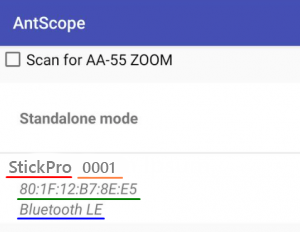 The window displays the following information:
 The analyzer battery can also be charged separately. For this, it is necessary to remove it from the analyzer by unscrewing the two screws of the battery cover and place it in an external charger.The Stick Pro analyzer is protected against battery polarity reversal. An incorrectly installed battery will not cause damage to the analyzer, and when the charger

 and , and the selection of the required item with the key.After the start analyzer will offer to alternately connect open, short and load calibration standards and press the key.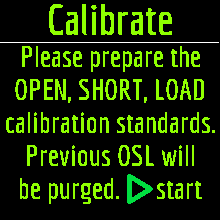
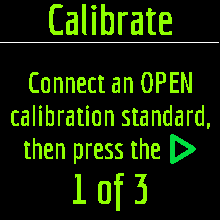
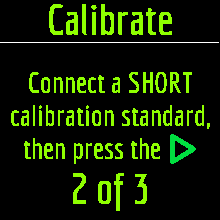
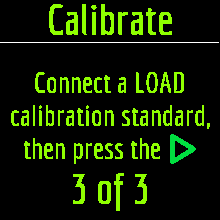
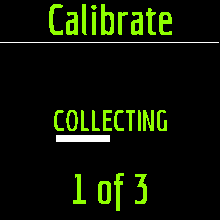
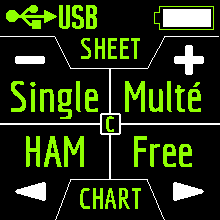 Also, the third item will be available in the Settings menu:


Jim Gifford
When I received my call sign a few years back, I was flooded with purchases of junk. Fast forward to 2019. I decided I wanted to build another option, not a dealer who has the same stuff as everyone else, but a dealer who actually uses what he sells. And that’s exactly what I do. If you see a product on this page or one of our tables at Hamfest, you can bet we have tried it and like it. From Radios to connectors we strive to bring you QUALITY. Sure, you can find it cheaper and we understand that, but if you don’t want to buy it again in 6 months, take a look at what we sell and have already approved. I am always just a phone call away. Jim Gifford, KM4MPF.
CALL US AT 1-833-4-KM4MPF / 1-833-456-4673 AND FIND OUT WHEN WE WILL BE AT A HAMFEST NEAR YOU.
BusinessHours
Monday-Friday
8:00 till 4:00
Saturday
9:00 till 1:00
Sunday
Closed
